Managing multiple opencode sessions in tmux
A tmux picker that shows what your AI agents are doing
Once you run more than one opencode session, keeping track of them gets hard. Your panes sit across many windows and sessions, each running its own opencode instance.
I built two small tools to fix this: a status server plugin that every opencode instance runs, and a tmux picker that shows all running sessions at a glance with their live status.
The problem
Opencode panes look identical in tmux. There is no indication of what a session is doing, whether it has processed your last message, or is stuck waiting for you to answer a question or approve a permission. When you work across several sessions in parallel, you spend more time checking up on them than actually reviewing output.
The status server plugin
Opencode knows everything about its sessions. The trick is getting that information out. I wrote a global plugin that spins up a tiny HTTP server inside every opencode instance. The plugin subscribes to the session event stream and keeps an in-memory store of titles and statuses.
// ~/.config/opencode/plugins/status-server.js
export const StatusServerPlugin = async ({ client, directory }) => {
  ...
  return { event, dispose }
}
Anything in ~/.config/opencode/plugins/ is auto-loaded,
so there is no config or import to wire up. The plugin tracks three things
per session:
- the session title
- whether it is busy or idle
- whether it is waiting on a question or permission
The "waiting" state is the important one. Opencode surfaces it as question and permission events, and I flag the session so the picker can surface it immediately.
GET http://127.0.0.1:<random-port>/status

{
  "pid": 1234,
  "directory": "/home/you/project",
  "sessions": {
    "abc123": { "title": "Refactor auth middleware", "status": "waiting" },
    "def456": { "title": "Write unit tests", "status": "busy" }
  }
}
Each instance picks a random free port when it starts, which keeps multiple opencode processes from colliding. To find that port, the picker probes the process table.
Finding the port
The picker starts from pane_pid, which tmux
reports as the command running in the pane - usually a shell.
Opencode is that shell's child, so the script walks one level down:
get_opencode_child_pid() {
  local pane_pid="$1"
  local child
  child=$(pgrep -P "$pane_pid" -x opencode 2>/dev/null | head -1)
  if [[ -n "$child" ]]; then
    echo "$child"
    return 0
  fi
  if [[ -d "/proc/$pane_pid" ]]; then
    local comm
    comm=$(cat "/proc/$pane_pid/comm" 2>/dev/null)
    [[ "$comm" == "opencode" ]] && echo "$pane_pid"
  fi
Assumes a direct child
This walk assumes opencode runs as a direct child of the pane's
command. If you launch it through a wrapper, the one-level -P lookup misses it.
When opencode replaces the shell with exec, the pane PID is the
opencode process itself. Either way you end up with the right PID,
and once you have it, ss -tlnp shows which port
it is listening on:
ss -tlnp | grep "pid=1234,"
# LISTEN  0  1024  127.0.0.1:43210  0.0.0.0:*  users:(("opencode",pid=1234,fd=29))
With the port in hand, a quick curl against /status returns the live session state.
The tmux picker
The picker is a bash script bound to prefix + o. It does four things:
bind-key o run-shell "bash ~/.config/tmux/scripts/opencode-picker.sh"-
finds every pane running opencode across all sessions using
tmux list-panes -afiltered by the current command - resolves each pane to its opencode PID and status port
- queries each status server and parses all responses at once
-
builds a label format string and opens
tmux choose-treewith it
The result is a tree of your sessions that looks like this:
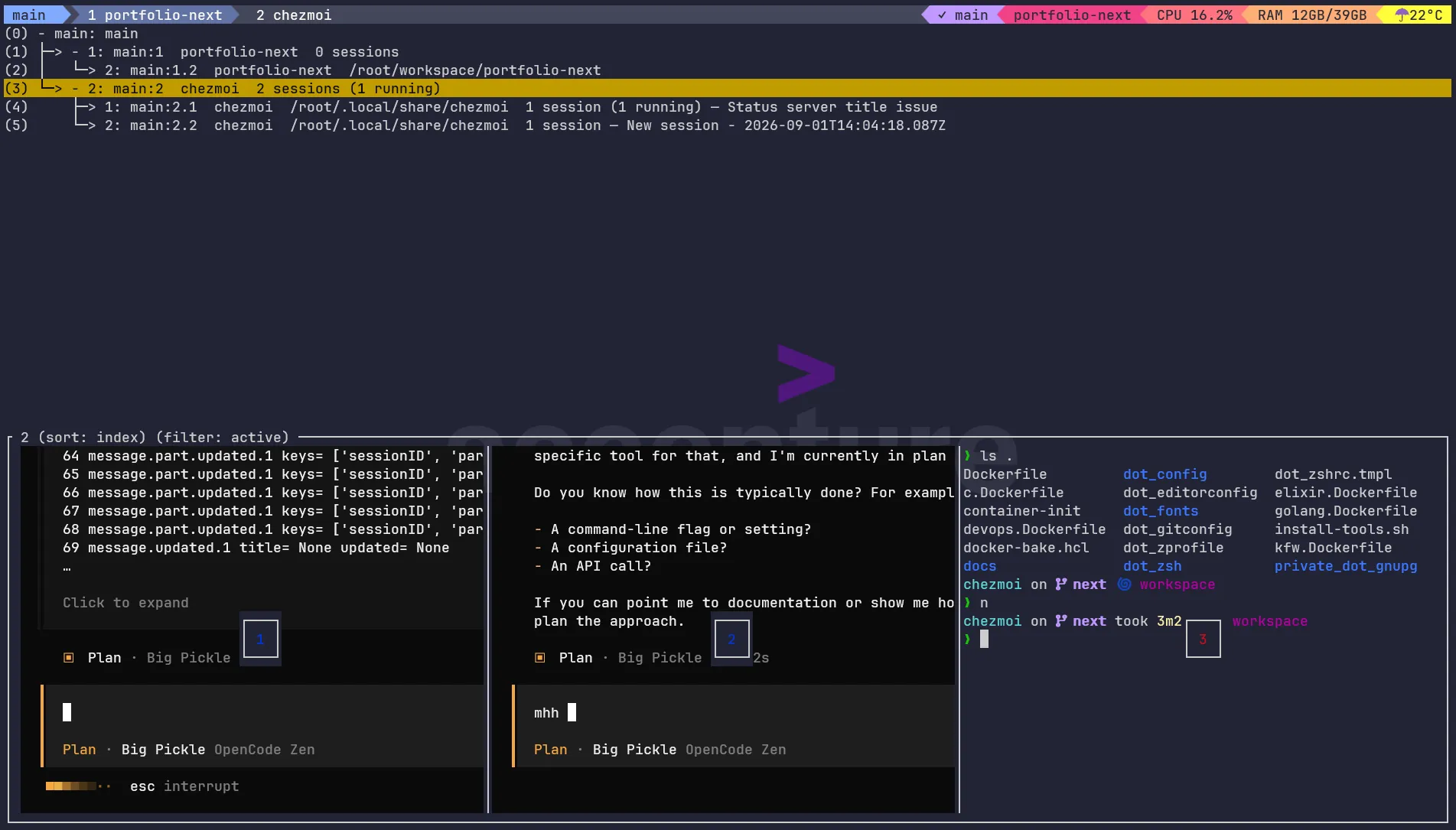
Selecting an entry switches you straight into that pane. No more tabbing through every window.
Batch parsing in Python
Querying a dozen panes means a dozen /status calls.
Instead of spawning a parser per pane, the script pipes all raw JSON into
one Python process that reads it line by line and emits one tab-separated
row per pane:
TOTAL RUNNING WAITING TITLE PRIORITY LABEL
2    1       1       Refactor auth middleware  2  2 sessions (1 running; 1 waiting) — Refactor auth middleware
The title is picked from the most interesting session in that pane: waiting sessions first, then running ones, then anything else.
Labels in a format string
Tmux choose-tree -F takes a format string, but
you cannot compute custom labels per pane inside it. The trick is generating
a giant chain of nested conditionals that maps each pane ID to its label:
#{?#{==:#{s/%/p/:pane_id},p2}, 2 sessions (1 running; 1 waiting) — Refactor auth middleware,
  #{?#{==:#{s/%/p/:pane_id},p5}, 1 session (1 running) — Write unit tests, waiting-for-input,
    #{?...}
  }
}
Tmux walks down this chain for each row, comparing the row's ID
against every known ID until one matches, then returns that label.
The #{?…} tail is a fallback for panes with no
opencode session.
The same approach works at the window and session level. Panes are
compared on pane_id, windows on window_id, and sessions on session_id. The script aggregates counts up
the tree, so a window with two opencode panes shows the total for
both.
# three lookup chains, one per level
PANE_FMT="#{?#{==:#{s/%/p/:pane_id},p2}, 2 sessions (1 running; 1 waiting) — Refactor auth middleware,...}"
WIN_FMT="#{?#{==:#{s/%/w/:window_id},w1}, 3 panes (2 running; 1 waiting) — Refactor auth middleware,...}"
SES_FMT="#{?#{==:#{s/%/s/:session_id},s1}, 1 window (3 panes) — my-project,...}"

# outer dispatch picks the chain for each row's level
FMT="#{?#{pane_format},${PANE_FMT},#{?#{window_format},${WIN_FMT},${SES_FMT}}}"

tmux choose-tree -Z \
  -f '#{==:#{pane_current_command},opencode}' \
  -F "$FMT" \
  "switch-client -t '%%'"
Depends on the process name
Pane detection compares the pane's current command against opencode. If you rename the process, the -f filter and the -x
match both need adjusting.
Tmux evaluates the format string once per row and sets exactly one
of #{pane_format}, #{window_format}, or #{session_format} to 1, depending on the level
being rendered. The outer conditional branches on those flags, so each
row picks the label built for its level.
Commas break the label
The comma is tmux's argument separator in a format string, so a comma in a session title would break the label. The parser replaces commas with semicolons before embedding them.
What it feels like
Instead of hunting through panes, I hit prefix + o, see which sessions are waiting
for me, and jump straight there. When I kick off a long refactor in
one pane and keep coding in another, the picker tells me at a glance
when it is done or when it hit a question I need to answer.
Because each instance runs its own status server on a random port with no shared config, it scales to any number of projects and tmux sessions.